
TL;DR:
- Smart thermostats in Central Florida optimize HVAC efficiency by learning occupancy patterns, weather, and humidity. They provide remote control, energy reports, and occupancy detection to enhance comfort and reduce costs. Proper installation, seasonal adjustments, and user engagement are essential for maximizing their savings and performance.
Your thermostat does a lot more than just set a temperature. In Central Florida, where summer heat and humidity can push your AC to run almost continuously for months, the difference between a basic thermostat and a smart one can mean hundreds of dollars saved every year. Smart thermostats actively manage your HVAC system by reading occupancy, learning your schedule, connecting to weather data, and responding in real time. This article covers everything you need to know about how this technology works, which features matter most for Central Florida homes and rentals, and how to avoid the mistakes that prevent most homeowners from getting real results.
Table of Contents
- What is smart thermostat technology?
- How do smart thermostats optimize comfort and savings?
- Key features for Central Florida homes and rentals
- Smart thermostat installation: common pitfalls and best practices
- Why “set-and-forget” is a myth: our expert take
- Get expert help optimizing your HVAC and smart thermostat
- Frequently asked questions
Key Takeaways
| Point | Details |
|---|---|
| Wi-Fi enabled controls | Smart thermostats connect to Wi-Fi for remote access and HVAC control. |
| Automatic comfort optimization | Sensors and online data help tailor HVAC scheduling for both comfort and energy savings. |
| Critical for Florida humidity | Humidity-aware modes and sensor placement matter in Central Florida homes. |
| Proper installation vital | Installation quality and HVAC integration strongly affect efficiency and results. |
| Ongoing attention pays | Adjusting settings and learning usage habits over time maximizes savings. |
What is smart thermostat technology?
Most people think of a thermostat as a dial or digital panel that tells the AC to turn on and off. That’s all a traditional thermostat does. A programmable thermostat adds pre-set schedules, letting you set different temperatures for different times of day. A smart thermostat goes far beyond both.
A smart thermostat is a Wi-Fi-connected device that controls your home’s heating, ventilation, and air conditioning (HVAC), offering scheduling plus remote and app-based management. Think of it as giving your HVAC system a brain. Instead of simply responding to a temperature reading, a smart thermostat gathers data, learns patterns, and makes adjustments based on what’s actually happening in and around your home.
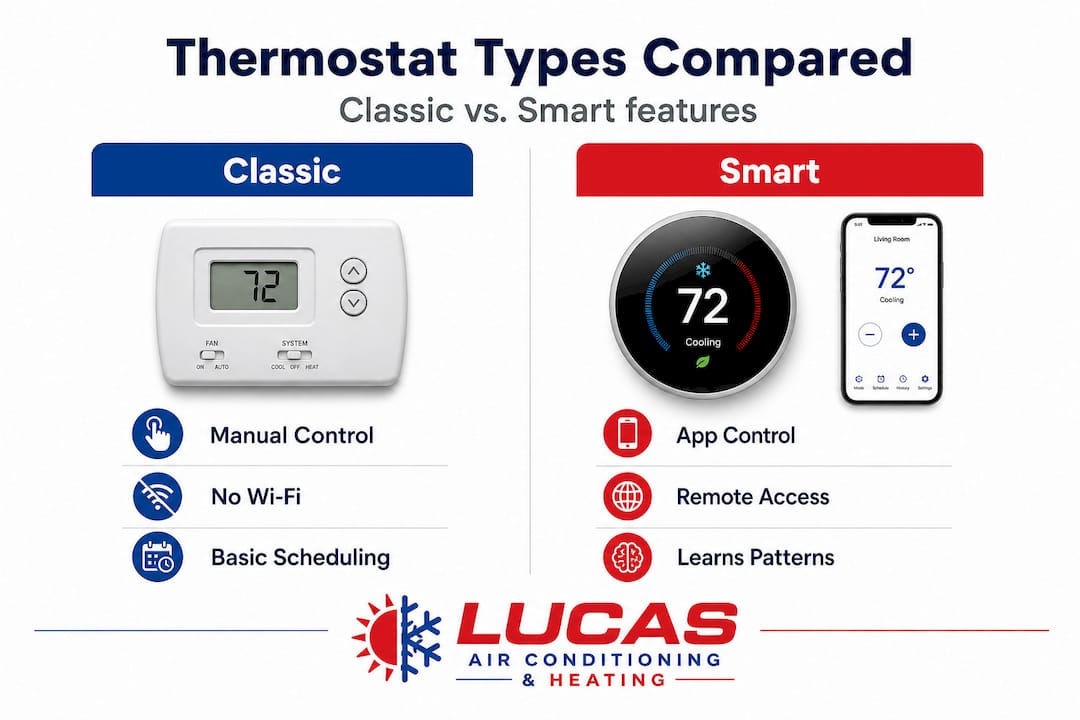
Here’s a quick comparison to understand the differences:
| Feature | Classic thermostat | Programmable thermostat | Smart thermostat |
|---|---|---|---|
| Manual temperature control | Yes | Yes | Yes |
| Pre-set scheduling | No | Yes | Yes |
| Remote app control | No | No | Yes |
| Learning and self-adjustment | No | No | Yes |
| Weather and humidity integration | No | No | Yes |
| Occupancy sensing | No | No | Yes |
| Energy usage reports | No | No | Yes |
Beyond what’s in that table, modern HVAC features have evolved to work hand-in-hand with smart thermostats, making the whole system far more responsive and efficient than older setups.
Core smart thermostat features include:
- Remote access via smartphone, tablet, or web browser
- Learning algorithms that study your daily habits and adjust automatically
- Occupancy detection using motion sensors or phone location
- Integration with voice assistants like Amazon Alexa and Google Home
- Energy usage dashboards showing daily, weekly, and monthly consumption
- Multi-room sensor support for more precise comfort control
- Humidity monitoring and climate-aware adjustments
- HVAC system alerts when maintenance or filter changes are needed
Each of these features does real work toward saving energy and keeping your home comfortable. They’re not just gimmicks.
How do smart thermostats optimize comfort and savings?
A basic thermostat reacts. A smart thermostat anticipates. That’s the real shift in how this technology operates, and it matters a lot in Central Florida.
Smart thermostats use sensor inputs and online data, such as local weather forecasts, plus occupancy and usage information to adjust temperature setpoints and optimize HVAC runtime for both comfort and energy efficiency. What does that actually look like day to day?
Imagine it’s July in Lake County. You leave for work at 8 a.m. and typically come home around 5:30 p.m. A smart thermostat learns that schedule within the first week. It lets the temperature drift upward while the house is empty, then begins pre-cooling about 30 to 45 minutes before you walk through the door. By the time you arrive, the house feels comfortable without the system having run at full blast all day. That alone can produce noticeable savings on your electric bill.
Now add weather data. If the forecast shows an unusually cool morning, the thermostat may delay cooling startup automatically. If a heat spike is predicted in the afternoon, it pre-cools the house earlier to avoid peak demand. These small adjustments add up fast across a full Florida summer.
Here’s how real-world savings compare based on typical usage patterns:
| Usage scenario | Estimated monthly savings |
|---|---|
| Unoccupied home at default temp (75°F) vs. setback (82°F) | $25 to $50 |
| Weather-responsive pre-cooling vs. fixed schedule | $15 to $30 |
| Occupancy-based runtime reduction | $20 to $40 |
| Humidity-aware operation vs. standard cooling | $10 to $25 |
Savings vary by home size, insulation, and how well the system is set up, but the pattern is consistent. Smarter operation means fewer wasted runtime hours.
The sensors are doing a lot of the heavy lifting here. Temperature sensors are obvious, but occupancy sensors detect motion and human presence to determine whether rooms are in use. Some models track door and window openings. Combined with your phone’s GPS, the thermostat always has a clear picture of whether anyone is home.
Florida’s humidity is its own challenge. Energy-saving HVAC tips specific to this region always emphasize humidity management, and for good reason. A smart thermostat that accounts for both temperature and relative humidity can prevent that sticky, clammy feeling even when the indoor temperature reads 74°F.
Pro Tip: At the start of each season, review your thermostat’s schedule and comfort settings. What works well in March often doesn’t hold up in August. A five-minute seasonal adjustment can make a big difference in both your comfort and your energy bill.
Key features for Central Florida homes and rentals
Smart optimization is powerful, but Central Florida’s climate adds nuance. Here are the most important features to look for and use in this region.
Geofencing is one of the most practical tools available. Geofencing uses your phone’s location to automatically adjust temperatures when residents leave or return home. For property managers handling short-term or long-term rentals in Orange, Lake, or Osceola counties, this feature prevents the common problem of guests leaving the AC running at full blast while the unit sits empty. For homeowners, it means you never come home to a hot house or waste energy cooling an empty space.
Humidity-aware modes are essential here. Florida’s average outdoor relative humidity sits above 70% for much of the year. Standard thermostats only control temperature, so they can shut off cooling before the indoor humidity drops to a comfortable level. This leaves you cold but still clammy. Smart thermostats with humidity sensing or dedicated dehumidification modes run the system slightly longer to pull moisture from the air before cycling off. Understanding humidity-aware modes is critical for Florida homeowners, especially during the wet season from June through September.
Room sensors address a major pain point in Florida homes. Large open floor plans, vaulted ceilings, and lots of windows create uneven temperature distribution. One corner might be 76°F while a bedroom near the garage reads 80°F. Room sensors placed strategically throughout the house allow the thermostat to prioritize comfort where it matters most, at the time it matters most.
Key features to prioritize for Central Florida specifically:
- Geofencing with multi-user support for households with different schedules
- Humidity percentage display and dehumidification control
- Remote temperature sensors for rooms with inconsistent comfort
- Energy history reports by day and week to catch unusual usage spikes
- HVAC system health alerts to catch filter or maintenance issues early
- Integration with local weather services for pre-cooling during heat advisories
For rental property managers, HVAC considerations in Central Florida real estate involve balancing tenant comfort with energy cost control, and smart thermostats can help manage both at once. Likewise, understanding HVAC’s role in Central Florida rentals means recognizing that smart controls can actually protect your system by preventing guests from running it at extreme settings.
Pro Tip: Place room sensors away from windows, exterior walls, and direct sunlight. These spots create false temperature readings that throw off the thermostat’s logic. Interior walls, about five feet off the floor, give the most accurate picture of actual living conditions.
Smart thermostat installation: common pitfalls and best practices
Central Florida homeowners often assume smart thermostat installation is as simple as swapping out the old unit. It’s usually not.
Smart thermostats are not purely set-and-forget devices. Installation quality, user behavior, and how the device’s automation interacts with your specific HVAC system all strongly influence whether you actually get the savings and comfort you’re expecting. That’s not a reason to avoid them. It’s a reason to set them up properly.
Here’s a step-by-step guide to avoid the most common mistakes:
- Check HVAC compatibility first. Not all smart thermostats work with all systems. Multi-stage systems, heat pumps, and systems without a common wire (C-wire) can cause issues. Confirm compatibility before purchasing.
- Identify your wiring configuration. Take a photo of your existing thermostat wiring before removing anything. Mislabeled wires are a frequent cause of installation problems.
- Verify C-wire availability. Most smart thermostats require a C-wire for constant power. If yours doesn’t have one, an adapter kit or new wire run may be needed.
- Choose sensor placement carefully. Don’t mount the thermostat near the kitchen, a bathroom, or an exterior door where temperature swings will mislead the system.
- Set your initial schedule manually. Don’t rely entirely on learning mode for the first few weeks. Give the thermostat a solid baseline schedule to build from.
- Enable energy reports and review them. Most homeowners never look at the data their smart thermostat collects. That data tells you if something is wrong with your system or your habits.
- Test all connected sensors. If you install remote room sensors, verify they’re communicating properly and influencing comfort schedules.
“Smart thermostats are not entirely set-and-forget. Behavior, installation quality, and how the device’s automation interacts with your specific HVAC operation can strongly influence whether you get savings.”
Staying current on HVAC maintenance best practices is just as important once your smart thermostat is in place. A smart thermostat paired with a poorly maintained system is like a high-performance engine running on dirty oil. The controls may be optimized, but the equipment can’t deliver.
Why “set-and-forget” is a myth: our expert take
Here’s something that surprises most homeowners when we talk through their energy bills: they installed a smart thermostat, assumed it would handle everything, and then never touched it again. Six months later, they’re not seeing the savings they expected.
Smart thermostats are genuinely impressive technology. But they don’t operate in a vacuum. The device learns your past behavior, which means if your past behavior was inefficient, the thermostat learns that too. Manual overrides, frequent schedule changes, and inconsistent routines all chip away at efficiency gains. The learning algorithm can only do so much if the inputs it’s working with are chaotic.
What we’ve seen consistently in Central Florida homes is that the biggest savings come from a combination of three things: a well-installed device, a correctly maintained HVAC system, and a homeowner who checks in on settings at least seasonally. That last part is almost always skipped.
The overlooked factors that determine whether a smart thermostat truly performs include:
- Whether the HVAC system itself is operating at rated efficiency
- Whether the thermostat is wired correctly and communicating with the system as designed
- Whether the homeowner has enabled and reviewed humidity settings
- Whether occupancy detection is actually working in the home’s layout
- Whether the device’s filter or maintenance alerts are being acted on
- Whether seasonal schedule reviews are happening twice a year
We recommend setting a calendar reminder every spring and fall to spend 15 minutes reviewing your thermostat’s settings, energy report, and comfort data. This simple habit closes the gap between what the device promises and what you actually experience. If you’re also tracking Central Florida HVAC savings, you’ll find the data confirms it repeatedly: maintenance and attention are what separate the best results from average ones.
Smart thermostats work. They work even better when you stay engaged with them.
Get expert help optimizing your HVAC and smart thermostat
Smart thermostat knowledge is only the first step. Putting it into practice in your home, with the right device, the right wiring, and the right HVAC system underneath it, is where real results happen.

At Lucas Air Conditioning and Heating, we work with Central Florida homeowners and property managers every day on exactly these challenges. Whether you’re ready to upgrade your system following our HVAC installation guide or you need reliable HVAC repair services to make sure your equipment can actually deliver what your smart thermostat is asking for, our team is here to help. We’re locally rooted in Eustis, veteran-owned, and focused on giving you straight answers and dependable service. Call us or schedule online to get started.
Frequently asked questions
Do smart thermostats save money on electric bills in Central Florida?
Yes. Smart thermostats optimize HVAC runtime using real-time weather data, occupancy sensors, and usage patterns, which is especially valuable in hot and humid climates where AC runs nearly year-round.
Can smart thermostats control humidity indoors?
Many models include humidity-aware modes that extend cooling cycles to remove moisture before shutting off, preventing the clammy feeling that’s common in Florida homes even when the temperature seems right.
Is installation of a smart thermostat easy for Florida homeowners?
Not always. HVAC wiring and compatibility vary widely, and mistakes during installation can reduce performance or cause system errors, so professional installation is often the smarter choice.
What’s geofencing and how does it work in smart thermostats?
Geofencing uses your phone’s location to detect when you leave or return home, automatically triggering temperature adjustments so you’re never cooling an empty house or walking into a hot one.
Recommended
- Modern HVAC features that save money and boost comfort – Lucas Air Conditioning and Heating
- Energy saving HVAC tips for Central Florida: Cut bills 30% – Lucas Air Conditioning and Heating
- Why Upgrade HVAC Systems: Comfort and Cost Benefits
- HVAC zoning: boost comfort and slash energy costs – Lucas Air Conditioning and Heating
